
SFDX with Claude actually blew my mind
Hello.
On October 30 I joined HackWars, a Star Wars themed hackathon, where four teams split between the light and the dark side had to build a command center with agent orchestration and Agentforce. Arek, Konrad, Marek and I were the Rebellion, and we had 5 hours.
I hadn’t worked much with SFDX (Salesforce DX, where you keep your org’s metadata as files and work with them through the sf CLI) before. It’s a typical core tool, and my daily work is mostly Marketing Cloud. But a colleague from work recently helped me set it up, so this time I could use the whole setup and put Claude Code on top of it. After a short talk our team said the same thing:
“LET CLAUDE BUILD IT”
Arek, MarTech lead, took care of the storytelling and presentation, Konrad and Marek, two very strong core experts, handled the parts where sometimes I didn’t even know what was happening. My part was to kick off the project, create a roadmap for the Claude agents and handle the CRM backend.
I was shocked by how much you can build this way.
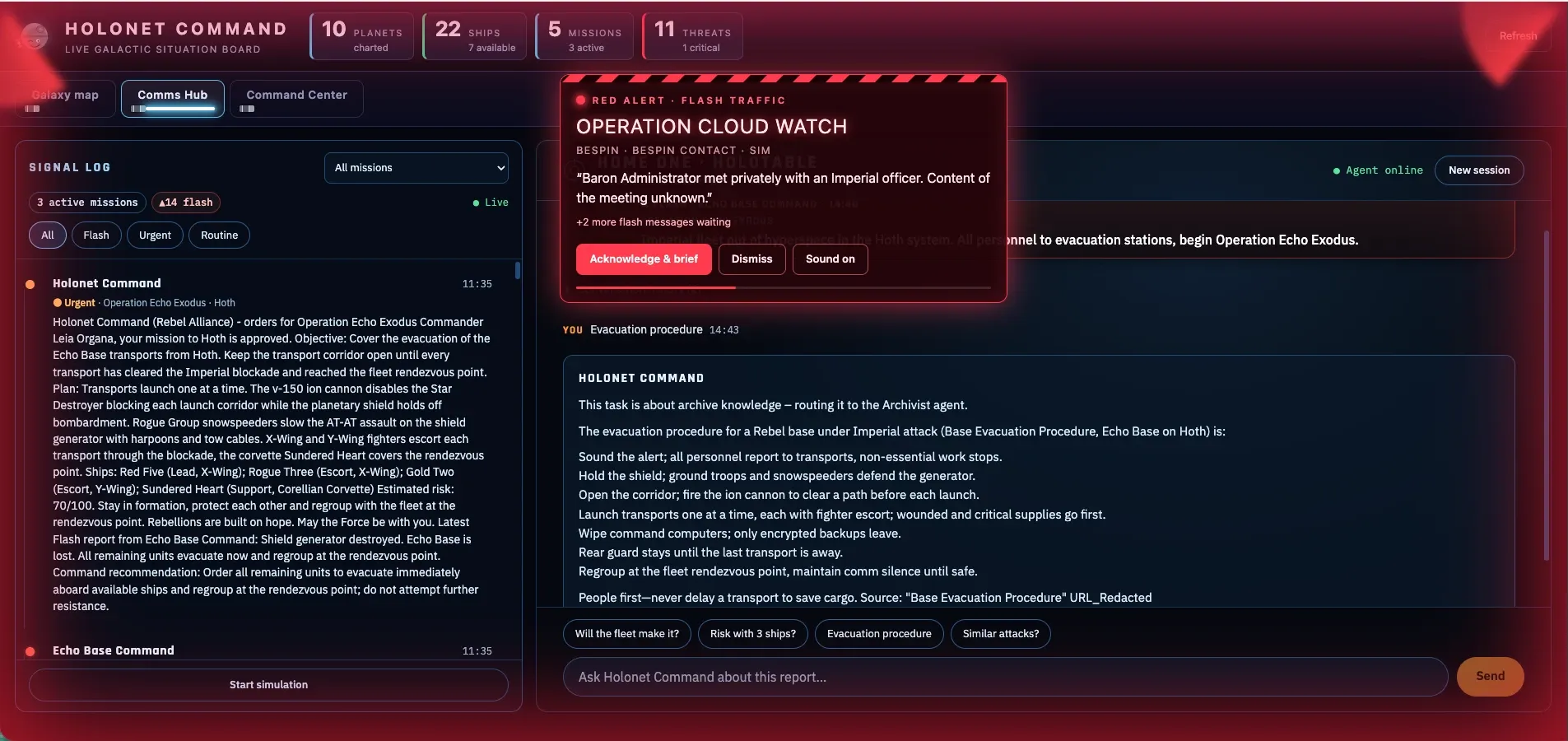
What we built in 5 hours
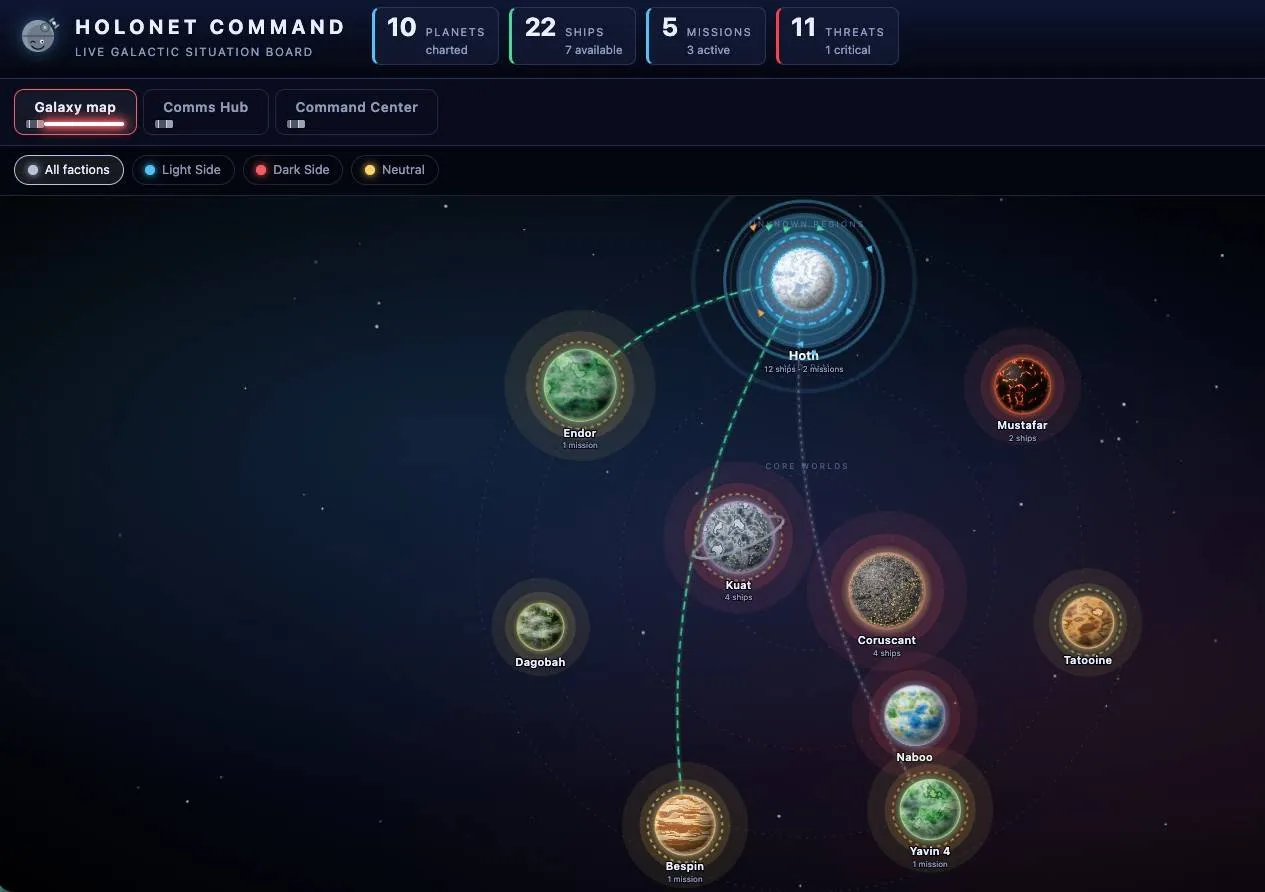
We built a command center for the Rebels during the Battle of Hoth, with live reports from missions and an AI orchestrator with several subagents under it, like:
- Scout (telling what’s really going on)
- Archivist (finding similar Imperial behavior patterns in recent attacks)
- Quartermaster (searching which assets we can use in response)
- Strategist (predicting the risk scale for specific scenarios)
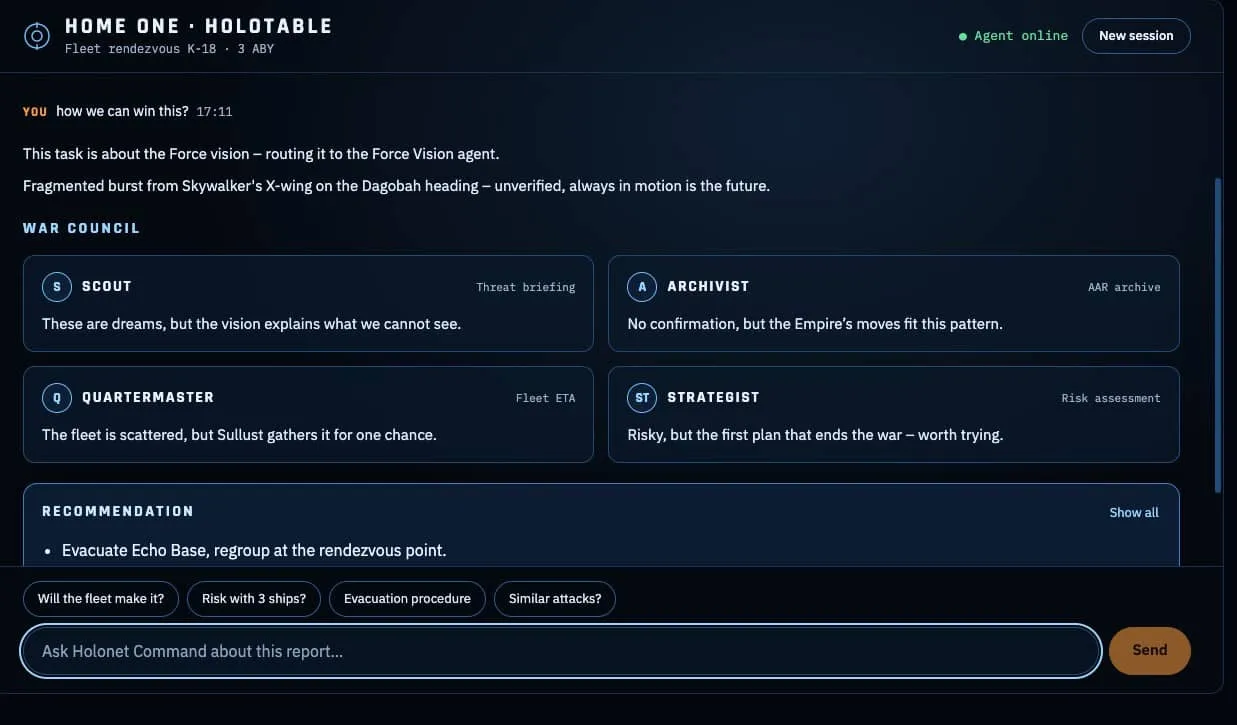
Based on their input, the orchestrator prepared a specific recommendation. With a single click you could decide whether to use the recommendation or escalate it to higher command. Agent also answered general questions like “What is a B-wing?” or “What is the evacuation procedure?”. At the end of the demo, we planned to ask the question “How can we win this war?” and get Anakin’s Dagobah vision as the answer, with a low calculated probability, but a Hail Mary recommendation.
Under the hood, we had a custom data model, around 25 Apex classes with tests, a custom Experience Cloud page with LWC components, seed data, a Knowledge library and 8 Agentforce subagents.
Building it by hand would have taken us couple of days, and that’s still with Claude vibecoding the components.
Why it was so fast
With SFDX most of your org’s configuration lives in files, and Claude Code handles files very well. It writes the metadata, deploys it, reads the error when the deploy fails and fixes it. My job was mostly checking what changed.
The second part was a CLAUDE.md file, which we treated as a contract for the whole team. Before anything reached the org, it already had the exact API name and type of every field (translated from Polish, shortened):
4.6 Ship__c (Ship / Ships)
| API | Type | Details |
|---|---|---|
Ship_Class__c | Picklist | X-Wing, Y-Wing, A-Wing, B-Wing, … |
Status__c | Picklist | Available (default), Assigned, Damaged, Destroyed |
Firepower__c | Number(3,0) | 1–100 |
Home_Base__c | Lookup(Account) | relationship name Stationed_Ships |
Hyperdrive_Class__c | Number(2,1) | e.g. 0.5, 1.0, 2.0 (lower = faster) |
It also listed every Apex action with its label, inputs and outputs:
| Class / Action label | Input | Output |
|---|---|---|
FleetServiceFind Available Ships | maxCount (default 5), minFirepower (opt.), shipClass (opt.) | shipsSummary, shipIds, count, message |
MissionServiceCreate Mission | planetName/planetId, threatId (opt.), objective, strategy, shipCount (default 3) | missionId, missionName, summary, message |
On top of that, every person owned their folders in the project. Because the names were fixed upfront, the Claude Code subagents for data, Apex and the agent wrote their parts at the same time, without waiting for each other.
Thanks to that, we started building before we even knew which side we were on. When it turned out we were the Rebellion, we had to clean everything related to the dark side out of the project (sorry, Vader). And every later change to the scenario worked the same way, costing a prompt and a redeploy.
What went wrong
We wasted some time just to realize that Knowledge was under FAQ__kav, instead of Knowledge__kav. Also, CLI login timed out inside Claude Code’s sandboxed terminal. Claude added its own mistakes, like Apex relationships without __r, tests failing on missing field permissions, and swapped page columns because it mapped the template regions wrong. These errors and many more cost us (and Claude) tens of minutes.
My favorite one was the platform’s security filter. It blocked “how can we win this war”, the question for our finale, and flagged it as Reverse_Engineering. 🙈 Dropping “war” wasn’t enough, and “how can we win this?” got blocked too, even in an ongoing session. There was probably a way to turn the check off, but we had no time for it. So the chat now quietly rewrites that question to “What does the future hold for the Rebellion?” and opens a fresh session for it.
On stage, of course, something had to break. Questions about the evacuation procedure and what a B-wing is failed, even though they had worked an hour earlier. Other questions, like the latest Imperial moves, went smoothly.
We also worked on one org without git. After the first conflicts we agreed that everyone pulls the latest version before editing, and that only one person works on the agent at a time.
What it means for building demos
For me, the biggest breakthrough was how much Claude could build in one go. It created the dummy data, the components, the org setup and the agents, pretty much all by itself. And if it could do that in the Star Wars universe, it can do the same for a telco, an e-commerce store selling electronics or a B2B company selling ready-made AI workstations.
This means building personalized, rich demos on test orgs is now very fast and easy. We had 5 hours and a scenario that kept changing along the way. With a good brief from presales, you can build a demo like this in a day instead of a few days, and without the rush we had.
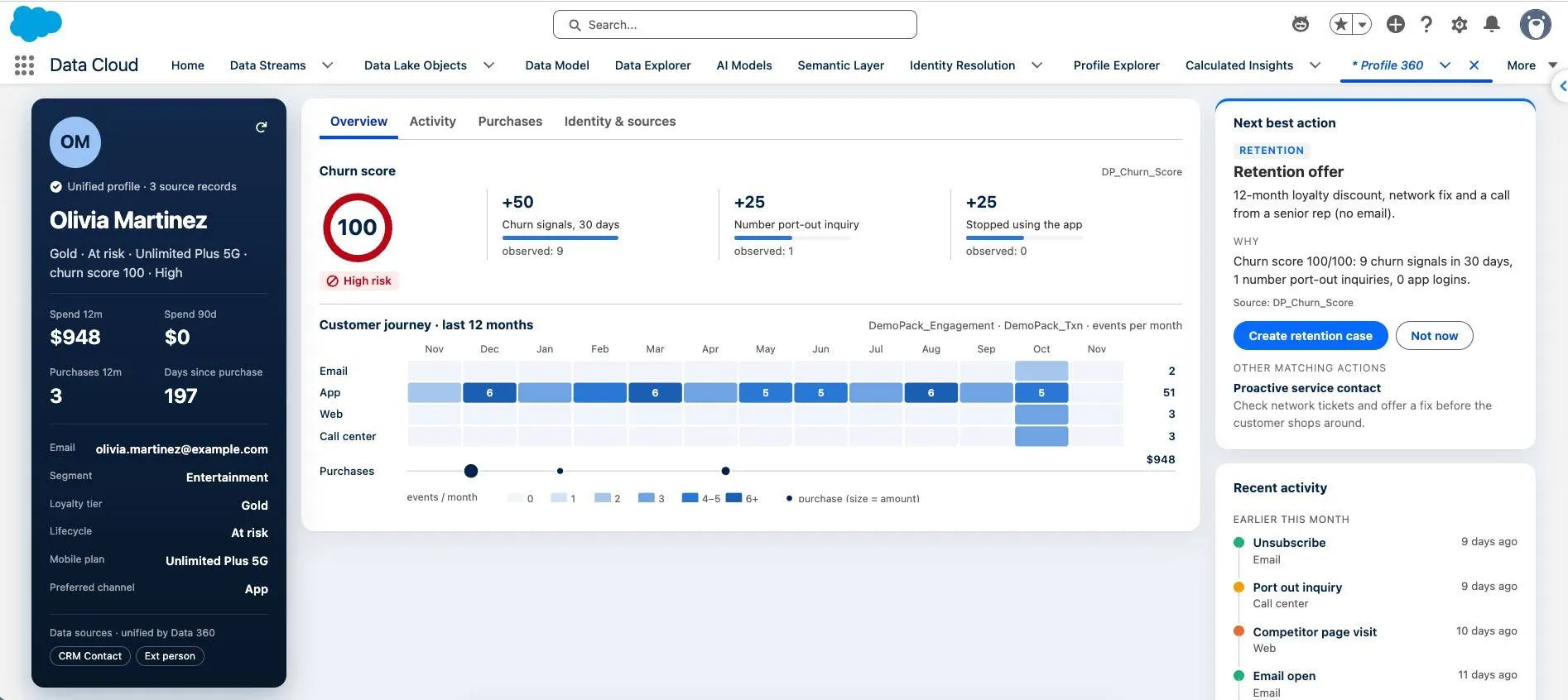
And this goes way beyond core. Marketing Cloud Next and Data 360 run on the core platform, so a big part of this SFDX workflow works there too. Marketing Cloud Engagement has no SFDX, but since Summer ‘26 it has an official MCP server (Model Context Protocol, the standard that lets AI tools work with external systems), hosted by Salesforce. You set it up with an Installed Package, connect it to Claude Code, and Claude can work with data extensions, emails, content, automations, journeys and SMS.
So the same approach fits most demos in the Salesforce marketing stack.
I’m currently working on automating the whole “demo prep” phase. You brief Claude on the demo you want, give it context about the client, and it builds everything automatically: dummy data, data streams and mappings, calculated insights, identity resolution, segments and agents. We’ll see how it goes.
After the hackathon I wrote some takeaways for myself:
- Give shared files one owner. Our conflicts always showed up in the permission set, the app file and the
.agentfile. - The agent’s behavior depends more on action descriptions and instructions than on Apex, and it can go backwards after any change (ours started inventing planets at one point). So test it after every publish (Marek did it for us).
- Don’t build the critical part of a demo on RAG (retrieval-augmented generation, in our case answers based on the Knowledge search). Some answers didn’t work, so for the finale we hardcoded the Dagobah vision in the instructions, and it was stable.
- Check what Claude writes! The lore needed 4 rounds of fixes, and the design took 4 iterations before it stopped looking like 100% generic AI slop (in the end it was more like 60% :P).
If you have tried building Salesforce metadata with AI and it went sideways, hit reply and tell me where. I’m collecting some best practices.
See ya!
Szymon.