
Config Snapshot for Salesforce Data 360 Beta
A Chrome extension that exports the configuration of your Data 360 org – data model, data streams, mappings, segments, activations and more – to one ZIP of JSON files. It runs in your browser, on your own Salesforce session.
Why I built it
Documenting a Data 360 org by clicking through Setup takes hours, and the document is out of date a week later. I needed the whole configuration on every project, so I built an extension that reads it through the Data 360 Connect API and saves it as one file you can keep, compare and process.
What's in a snapshot
| Module | Contents | API requests |
|---|---|---|
| Data model | DMOs, fields, types, keys, active relationships | 1 |
| Data streams | Streams, connectors, DLOs, source → DLO field mappings | 2 + 1 per stream |
| DLO → DMO mappings | Field mappings per DMO | 1 per DMO |
| Segments | Definitions with the criteria parsed into a tree | 1 per 100 segments |
| Activations | Targets, attributes, contact points, filters, static data | 2 + 1 per activation |
| Calculated insights | SQL, dimensions, measures | 4 |
| Identity resolution | Match and reconciliation rules, run statistics | 1 |
| Data graphs | Object trees, joins, recency, refresh schedule | 1 + 1 per graph |
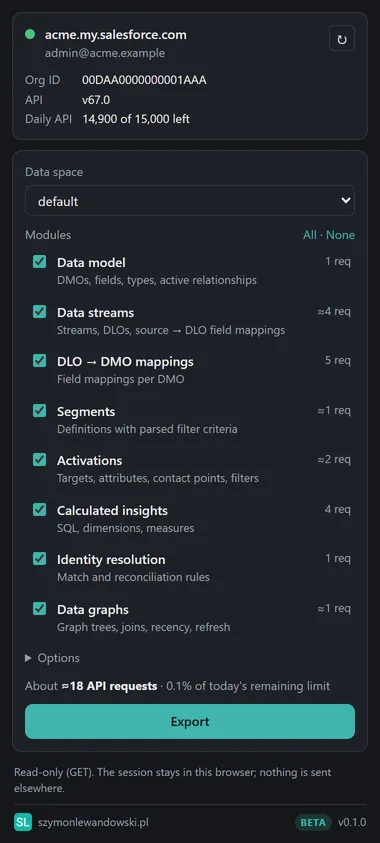
The panel estimates the requests before you export. The dev org I test on takes 53 requests and about 12 seconds.
How it works
- Open your org in Chrome (Lightning, Setup or the My Domain URL).
- Click the extension icon to open the side panel.
- Pick a data space and the modules, then click Export.
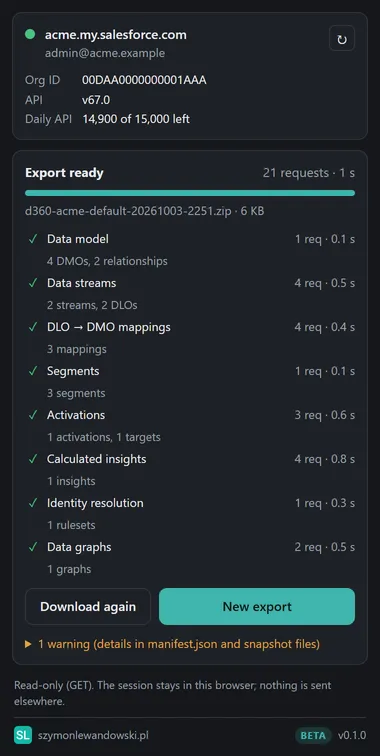
The ZIP lands in your Downloads. It holds a manifest.json with the export details and one normalized JSON file per module, with segment criteria parsed into a tree. The format is documented if you want to process it yourself.
Before you share a snapshot outside your team, turn on Redact filter values. It replaces literal values in filters, static activation data and SQL with <redacted> and keeps objects, fields and logic.
What you can do with a snapshot
- Document the orgStart a solution design or a handover from real configuration instead of screenshots.
- Compare environmentsCollections are sorted by name, so a sandbox and production snapshot give a clean diff.
- Track changesCommit snapshots to Git and every configuration change shows up as a diff.
- Ask an AI assistantGive the ZIP to Claude or ChatGPT and ask about your setup.
Install
The extension is in the Chrome Web Store. Click Add to Chrome and pin it from the puzzle icon in the toolbar. Chrome updates it automatically.
Install manually
If you prefer to run the build from GitHub, for example to try a version before it reaches the store:
- Download the ZIP from the releases page and unzip it into a folder you'll keep.
- Open
chrome://extensionsand turn on Developer mode. - Click Load unpacked and select the folder.
To update, replace the folder's contents and click the reload arrow on the extension's card.
Requirements: Chrome 116+, an org with Data 360 enabled, and a user with API access to the Data 360 configuration.
Permissions and privacy
| Permission | Why the extension needs it |
|---|---|
sidePanel | The UI is a side panel next to your Salesforce tab. |
cookies | Reads your Salesforce session cookie for the org in the active tab, so the extension can call that org's API as you. |
*.my.salesforce.com *.lightning.force.com *.my.salesforce-setup.com | Recognising the org in the active tab and calling its API. No other sites. |
The session cookie stays in the panel's memory and is never stored or logged. There is no analytics or remote code, and the source is on GitHub. Details are in the privacy policy.
Known limitations
- One snapshot covers one data space.
- Segments the API returns without criteria (some nested segments, vector search operators) are marked as such.
- Formula (transform) mappings aren't available through the API.
- No record counts or segment populations.
- Tested on API v67.0, and the extension never uses a newer version.
Something broken or missing? Tell me on GitHub Issues. The code is licensed under EUPL-1.2.
Unofficial and not affiliated with Salesforce. Salesforce, Data 360 and Data Cloud are trademarks of Salesforce, Inc.